
How to Hide Bundle Components from Your Storefront (Unlisted Status)
If you're selling bundles, you probably don't want customers buying bundle component products individually. For example, if you sell a "Build Your Own Chocolate Box" bundle, the individual chocolates should only be available inside the bundle - not listed separately on your storefront.
Shopify's Unlisted product status is designed for exactly this.
What is Unlisted status?
Unlisted products are active and purchasable, but hidden from your storefront. They won't appear in:
- Store search results
- Collections
- Product recommendations
- Internet search engines (they get noindex/nofollow)
- Your sitemap
Customers can still purchase unlisted products when they're referenced by an app like FoxSell Bundles Plus - which means they work perfectly inside your bundles.
Why not use Draft or remove from sales channels?
You might be tempted to set component products to Draft or remove them from the Online Store sales channel. Don't do this - both options will break your bundles:
- Draft status - Removes products from bundles entirely. Draft products can't be purchased at all.
- Removing from Online Store sales channel - Also causes products to disappear from the bundle widget.
Unlisted is the only status that keeps products hidden from your storefront while still working inside FoxSell bundles.
How to set a product to Unlisted
- In your Shopify admin, go to Products and open the product you want to hide.
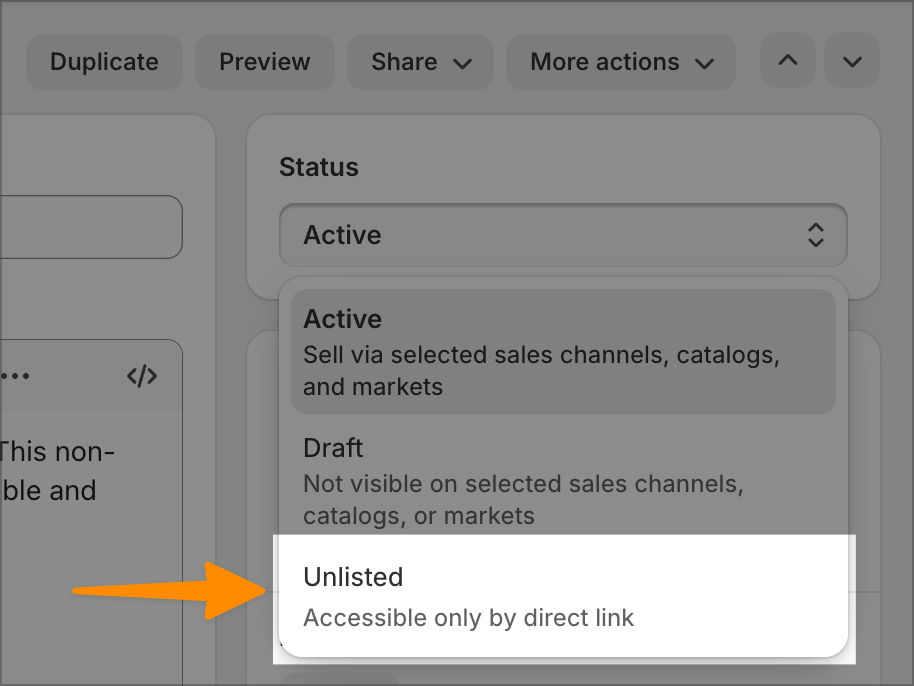
- Change the Status dropdown from Active to Unlisted.
- Click Save.
Tip: You can bulk-select multiple products from the Products list and change their status to Unlisted in one go - handy if you have a lot of component products.
Quick comparison
Status | Visible on storefront? | Works in FoxSell bundles? | Purchasable? |
|---|---|---|---|
Active | Yes | Yes | Yes |
Unlisted | No | Yes | Yes (via direct link or app) |
Draft | No | No | No |
Which bundle types does this work with?
Unlisted status works with all FoxSell bundle types:
- Mix and Match (Build Your Own Bundle)
- Fixed Bundles
- Multi Variant Bundles
Need help? Reach out via the in-app chat or email support@foxsell.app.
Updated on: 17/03/2026
Thank you!